

Short answer: Merchants usually move from BigCommerce to Shopify for three reasons: plan changes that are not tied to annual sales, a much larger app and theme ecosystem, and easier day-to-day store management. The move itself is a structured project: map your data and URLs, migrate with a CSV import, a migration app or a Shopify Partner, and 301-redirect every URL that changes. Plan prices and limits below were last checked in October 2026, so confirm them on each vendor’s pricing page before you decide.
Running an E-commerce store is no small feat. Between managing inventory, optimizing for conversions, and keeping up with customer demands, the last thing you need is a platform that slows you down.
If you’ve been feeling frustrated with BigCommerce, maybe due to rising costs, limited customization, or the constant struggle to scale, you’re not alone. Many of you find yourselves at this exact crossroads, wondering, “Is Shopify a better fit for my business?”
And that’s exactly what we’re here to explore.
We’ve helped countless stores make the switch, and trust us: moving to Shopify isn’t just an upgrade; it’s a game-changer. But before jumping in, let’s talk strategy. A well-planned migration ensures a smooth transition, and to simplify that, here`s our guide.
Let's dive in to understand -
What makes Shopify a better alternative? (Think ease of use, better performance, and cost-effectiveness.)
How does the migration process work? (Spoiler: It’s easier than you think!)
What about SEO, apps, and design freedom? (Shopify’s got some serious advantages here.)
How do you ensure a seamless switch? (No downtime, no data loss, just a smooth move.)
Sound good?
If you’re ready to optimize costs, simplify store management, and unlock Shopify’s full potential, this is your sign to make the move. Your business deserves a platform that works for you, not against you.
BigCommerce to Shopify Migration: Easier Than You Think!
Switching E-commerce platforms can feel like a daunting task, our minds stays clouded with what-ifs. What if you lose important data? What if the process disrupts your business? These concerns are completely valid, but let's burst the bubble. Migrating from BigCommerce to Shopify is easier than you expect.
Shopify has fine-tuned the migration process to be as seamless and stress-free as possible. With built-in migration tools and dedicated support, you can move your entire store, products, customers, orders, and more without the usual headaches.
Shopify describes three ways to migrate: a manual CSV import for simpler stores, third-party migration apps from the Shopify App Store, or a Shopify Partner for larger or more complex stores. You can combine them. Shopify says most businesses migrate in under three months, depending on catalogue size and complexity (Shopify migration guide).
Worried About Losing Data? No Need!
Imagine you’ve spent years building a loyal customer base and curating the perfect product catalog. The last thing you want is to start over from scratch. That’s why Shopify’s migration tools are designed to preserve every detail, from customer information to order history- so you can continue business as usual without missing a beat.
What moves depends on the method you choose. Shopify lists products, customers, historical orders, gift cards, store credits, blogs and pages as importable, but notes that a manual CSV import cannot move some data, such as orders and blog posts. Archive your BigCommerce data before you import, and agree with your migration partner exactly what will be moved and what will be rebuilt.
Help at Every Step
Not a tech expert? No problem. Shopify offers:
Step-by-step migration guides to walk you through the process
Detailed documentation to answer any questions along the way
A responsive support team to assist whenever you need help
Shopify Partner Directory Experts who make the process easier.
Minimal Downtime, Maximum Efficiency
In E-commerce, every second of downtime can mean lost revenue. Shopify’s structured migration process with experts ensures a quick and efficient transition so you can focus on what really matters: growing your store.
If you’re ready to move from BigCommerce to a more flexible, scalable, and cost-effective platform, Shopify has your back. With the right tools and experts, your migration can be smooth, hassle-free, and well worth the switch! Our BigCommerce to Shopify migration service covers the full move, from data and URL mapping to launch.
BigCommerce vs Shopify: Why Shopify is the Smarter Choice?
Shopify is the smarter choice for most growing merchants because it combines easier store management, a much larger app and theme ecosystem, and plan upgrades that follow the features you need rather than your annual sales. BigCommerce remains a capable platform with strong built-in features, so compare total cost and your team’s skills before you decide.
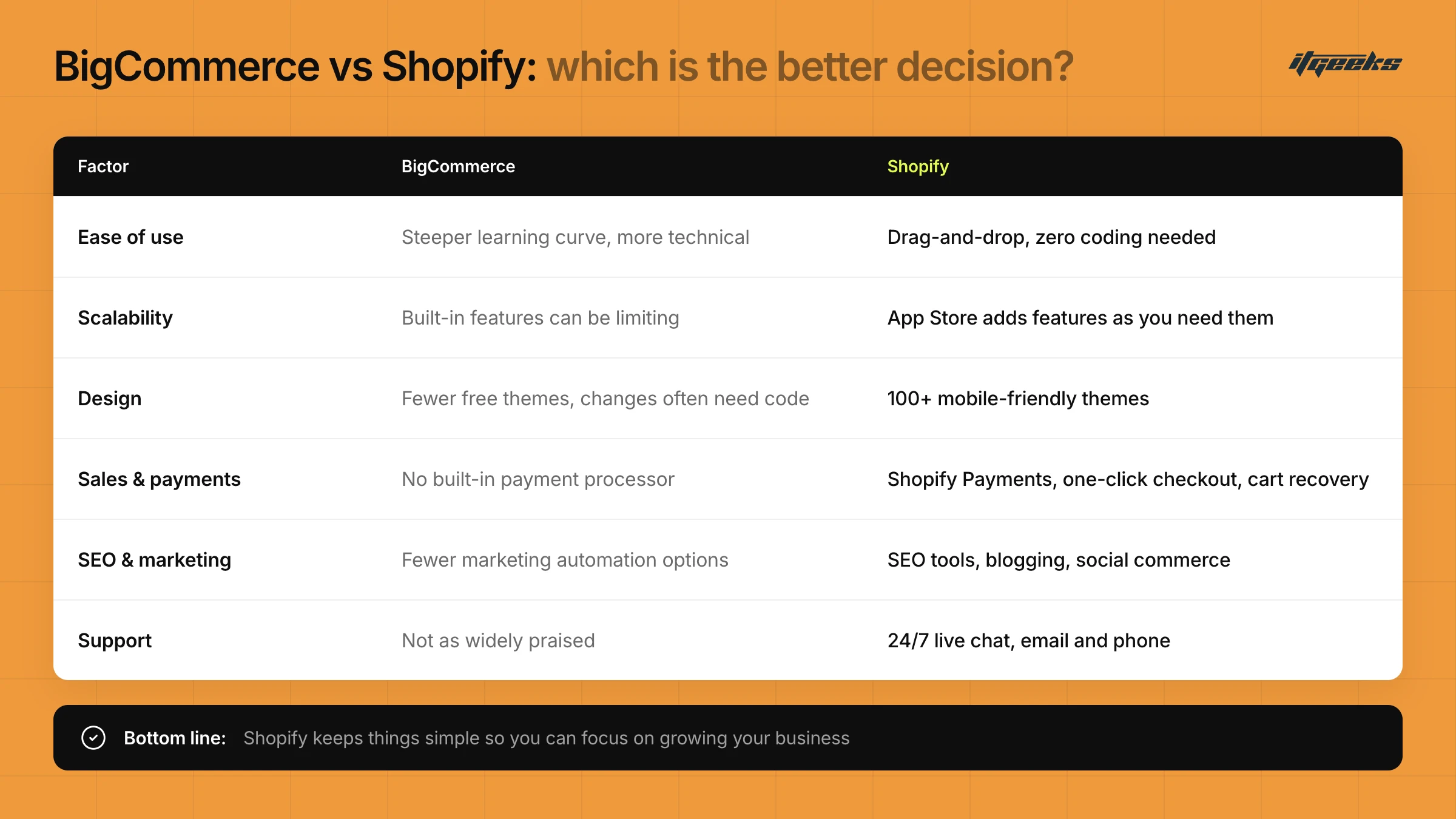
If you're debating whether to stick with BigCommerce or migrate to Shopify, let's cut to the chase: Shopify is the better long-term investment for you. It’s easier to use, more scalable, and packed with features designed to help you grow without technical headaches.
Here’s why Shopify outshines BigCommerce in almost every way:
1. Ease of Use: Set Up and Running in No Time
Shopify: Built for E-commerce owners, not developers. The user-friendly interface, drag-and-drop design, and intuitive dashboard make running your store a breeze, even if you have zero coding experience.
BigCommerce: This is More complex, with a steeper learning curve. Customizing your store requires technical know-how, making it harder for beginners.
Bottom Line: Shopify keeps things simple so you can focus on growing your business, not troubleshooting tech issues.
2. Scalability & Flexibility: Grow Without Limits
Shopify: Whether you're a small startup or an enterprise, Shopify grows with you. Its massive App Store lets you add features as needed, without overwhelming you with unnecessary tools upfront.
BigCommerce: This offers solid built-in features, but they can be limiting. You might find yourself needing expensive custom solutions as you scale.
Bottom Line: With Shopify, you’re never locked in. Add what you need, when you need it.
3. Design & Customization
Shopify: Offers 100+ beautifully designed themes, all mobile-friendly and optimized for conversions. Plus, the Shopify drag-and-drop builder makes it easy to tweak your site’s look without touching a single line of code.
BigCommerce: Fewer free themes and a more complex customization process. Making design changes often requires coding or hiring a developer.
Bottom Line: Shopify lets you create a stunning, professional-looking store in minutes.
4. Sales & Conversions: Maximize Your Revenue
Shopify: Offers built-in abandoned cart recovery, one-click checkout, and seamless integrations with top payment gateways, including Shopify Payments, which saves you from extra transaction fees.
BigCommerce: While it supports multiple payment gateways, it does not have a single built-in processor tied to the platform in the way Shopify Payments is. BigCommerce does not add its own transaction fee, so your total cost depends on the card rates of the gateway you choose.
Bottom Line: Shopify helps you close more sales.
5. SEO & Marketing: Get Found, Sell More
Shopify: Comes with powerful SEO tools, built-in blogging, and a massive App Store for email marketing, social media, and automation. Plus, Shopify’s partnerships with platforms like Facebook, Instagram, and TikTok make social commerce seamless.
BigCommerce: Decent SEO features but fewer marketing automation options compared to Shopify.
Bottom Line: Shopify makes it easier to drive traffic, convert visitors, and grow your brand across multiple channels.
6. Support & Community: Help When You Need It!
Shopify: Offers 24/7 customer support via live chat and email, with phone support depending on your plan and region. Plus, a massive community of developers, Shopify Experts, and fellow merchants to guide you.
BigCommerce: Also offers support, but it’s not as widely praised as Shopify’s highly responsive team.
Bottom Line: Shopify ensures you’re never left stranded when you need help.
Clearly, when it comes to effortless growth, scalability, and success, Shopify is the ultimate choice.
Not sure whether your store fits Shopify or Shopify Plus? Our guides on Shopify vs other e-commerce platforms and whether Shopify Plus is the right fit help you compare.
Cost Comparison: Why Shopify Offers Better Value Than BigCommerce?
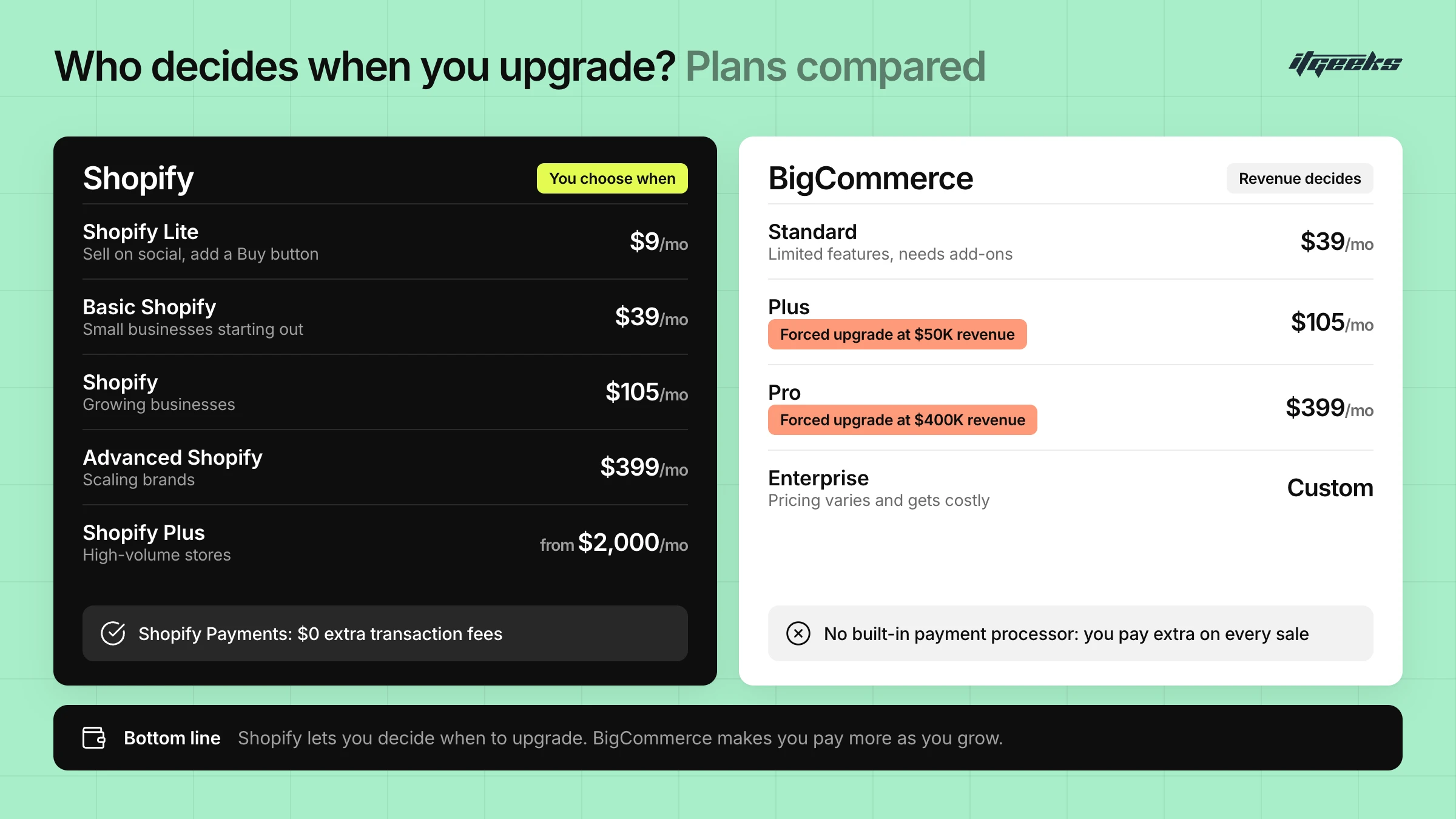
Shopify offers better value for many growing stores because its plan prices rise with the features you choose, not with your annual sales. Both platforms list $39, $105 and $399 for their three main plans on monthly billing, but BigCommerce moves you up a plan at set sales limits ($50K, $180K and $400K a year), while Shopify lets you decide when to upgrade.
When choosing an E-commerce platform, cost isn’t just about the subscription price. It’s about total value. While both BigCommerce and Shopify offer tiered pricing plans, Shopify provides more flexibility, better scalability, and lower hidden costs in the long run.
Let’s break down the cost comparison so you can see why Shopify is the smarter financial choice for your business.
1. Shopify’s Transparent & Scalable Pricing
Shopify Starter ($5/month): Sell on social media and messaging apps without a full online store (it replaced the older $9 Shopify Lite plan)
Basic Shopify ($39/month): Ideal for small businesses starting out
Grow ($105/month, previously named Shopify): Best for growing businesses
Advanced Shopify ($399/month): Designed for scaling brands.
Shopify Plus (from around $2,300/month on a three-year term): Enterprise-grade solutions for high-volume stores
The Best Part? Shopify’s pricing grows with you. Start small and upgrade only when you need more features.
Prices above are US monthly-billing list prices and can change. Shopify discounts annual billing, and Plus pricing depends on term length and sales volume, so check the current figures on Shopify’s pricing page.
2. BigCommerce’s Pricing: More Expensive as You Grow
BigCommerce forces you to upgrade based on your annual revenue, not your business needs.
If you exceed $50K in sales, you must move to the Plus plan ($105/month).
Over $400K in sales? You reach the top of the Pro plan, after which BigCommerce applies extra charges and, at higher volumes, moves you to the Enterprise plan (custom pricing), which gets very expensive quickly.
Standard Plan ($39/month): Limited features, requires add-ons; covers up to $50K in annual online sales
Plus Plan ($105/month): Forced upgrade at $50K in revenue; covers up to $180K
Pro Plan ($399/month): Forced upgrade at $180K in revenue; covers up to $400K
Enterprise Plan (Custom Pricing): Pricing varies and gets costly
Bottom Line? Shopify lets you decide when to upgrade. BigCommerce forces you to pay more as you grow.
Sales limits are taken from BigCommerce’s pricing page. BigCommerce can change its plans and names, so confirm the limits that apply to your account before you compare.
3. Hidden Costs: Transaction Fees & Additional Apps
Shopify Saves You Money on Transaction Fees
Use Shopify Payments and pay $0 in extra transaction fees
BigCommerce doesn’t charge its own transaction fee, but your payment gateway’s card rates still apply to every sale, so compare the full processing cost rather than the platform fee alone
If you use a third-party gateway on Shopify instead of Shopify Payments, Shopify charges an extra fee per order: 2% on Basic, 1% on Grow, 0.6% on Advanced and 0.2% on Plus (Shopify pricing). Shopify Payments is only available in certain countries and regions, so confirm it is supported where you sell.
Shopify’s App Store: More Affordable Add-ons
Need extra features? Shopify’s App Store has free & low-cost solutions
BigCommerce relies on expensive third-party integrations
Bottom Line? Shopify can help you keep more of your profits, especially when you use Shopify Payments and a lean set of apps.
No Surprise! Shopify Delivers More Value. It`s
More pricing flexibility: start at $5/month (Starter) or $39/month (Basic) and scale as needed.
No forced upgrades: you decide when to level up
Lower total cost: fewer hidden fees, more affordable apps
Built-in payment processor: avoid transaction fees
Scales with your business: from startup to enterprise
It is a complete game-changer! Believe us, it's just the beginning. What gives Shopify a competitive edge over all other traditional E-commerce platforms is its ecosystem.
Unlocking the Power of Shopify’s App Ecosystem!
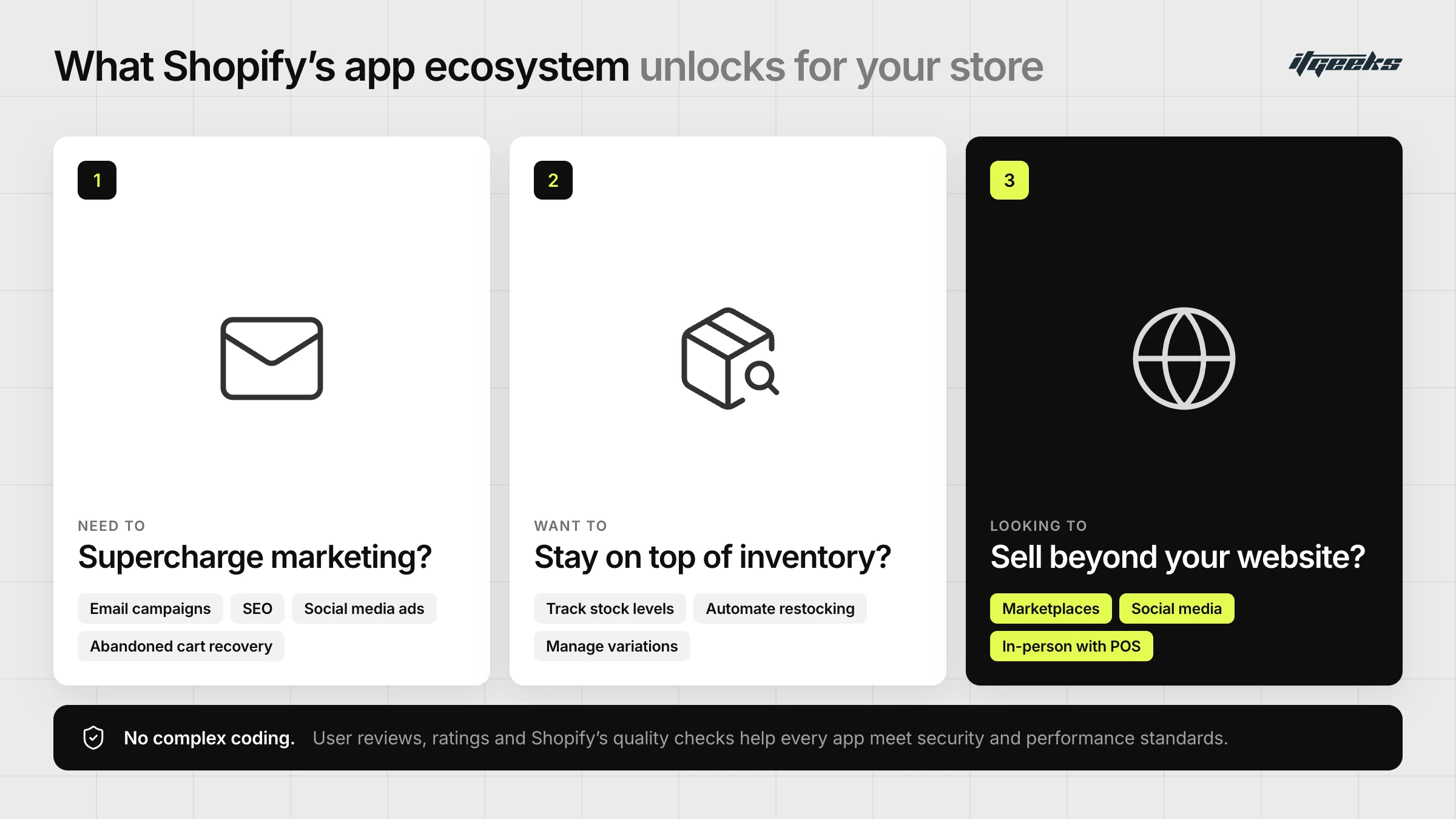
One of Shopify’s biggest game-changers? It's App Ecosystem, a powerhouse of tools designed to elevate your online store effortlessly. With over 16,000 apps listed in the Shopify App Store, you get access to everything you need to do: boost sales, streamline operations, and scale with ease- all without the hassle of complex coding or development work.
Need to supercharge your marketing?
There’s an app for that, whether it’s email campaigns, SEO, social media ads, or abandoned cart recovery.
Want to stay on top of inventory?
Shopify’s apps help you track stock levels, automate restocking, and manage product variations seamlessly.
Looking to expand beyond your website?
You can integrate with marketplaces, social media platforms, and even in-person sales through Shopify’s POS system.
The best part? It’s all built with user-friendliness in mind. No need to be a tech wizard. These apps are designed to be intuitive, so you can customize and optimize your store in just a few clicks. Plus, with user reviews, ratings, and Shopify’s strict quality checks, you can trust that every app meets high standards for security and performance.
Whether you’re a startup or a growing brand, Shopify’s App Ecosystem gives you the flexibility, efficiency, and innovation to build the online store of your dreams.
Before you migrate, list the BigCommerce features and integrations you rely on and match each to a Shopify feature or app. Our guide to getting the most from Shopify’s App Store shows how to choose well.
SEO Benefits of Switching to Shopify!
In the crowded world of E-commerce, getting found on search engines can make or break your store, and that’s exactly where Shopify gives you an edge. If you're moving from BigCommerce to Shopify, you're not just changing platforms; you're upgrading your SEO game with a system designed to help your store rank higher and attract more organic traffic.
To be fair, BigCommerce also has capable SEO features. The gain from moving comes mainly from Shopify’s ecosystem and day-to-day ease of use, and from how carefully you handle URL changes during the migration.
SEO-Friendly Architecture Built for Growth
Shopify makes SEO a priority right from the start. With customizable meta titles and descriptions for every product, category, and page, you have complete control over how your store appears in search results. Add to that Shopify’s clean and structured URLs, and you get a platform that’s both search-engine and user-friendly, helping Google understand your content while making navigation seamless for customers.
One thing to plan for: Shopify uses fixed URL prefixes such as /products/ and /collections/ that cannot be renamed, so most BigCommerce product and category URLs will change. Every changed URL needs a permanent 301 redirect to its new equivalent (see the checklist below).
Powerful Built-in SEO Tools
Shopify doesn’t just stop at the basics. It comes packed with features like:
Automatic sitemap generation: Ensuring search engines can crawl and index your store effortlessly.
Canonical tags: Prevent duplicate content issues that could hurt your rankings.
Editable robots.txt files: Giving you control over how search engines interact with your site.
Content That Ranks & Converts
Want to establish your store as an industry leader? Shopify’s built-in blogging platform makes it easy to publish high-quality content that boosts your SEO rankings. Regular blog updates signal search engines that your site is active and valuable, helping you attract more organic traffic while engaging potential customers.
Expert Support to Keep You Ahead
One of Shopify’s biggest advantages? It doesn’t leave you to figure out SEO alone. With extensive documentation, best practice guides, and a responsive support team, Shopify equips you with the knowledge and tools to keep optimizing and improving your search rankings long after migration.
A Smarter Move for Long-Term Growth
Switching from BigCommerce to Shopify isn’t just about a new platform; it’s about future-proofing your business. With Shopify’s SEO-focused approach, your store becomes more discoverable, drives more organic traffic, and, ultimately, generates more sales.
If your goal is to rank higher, reach more customers, and grow your business effortlessly, switching to Shopify is the smartest SEO move you can make
Want the full playbook? Read how to maintain SEO rankings during a Shopify migration.
Enhanced Performance & Seamless Scalability with Shopify
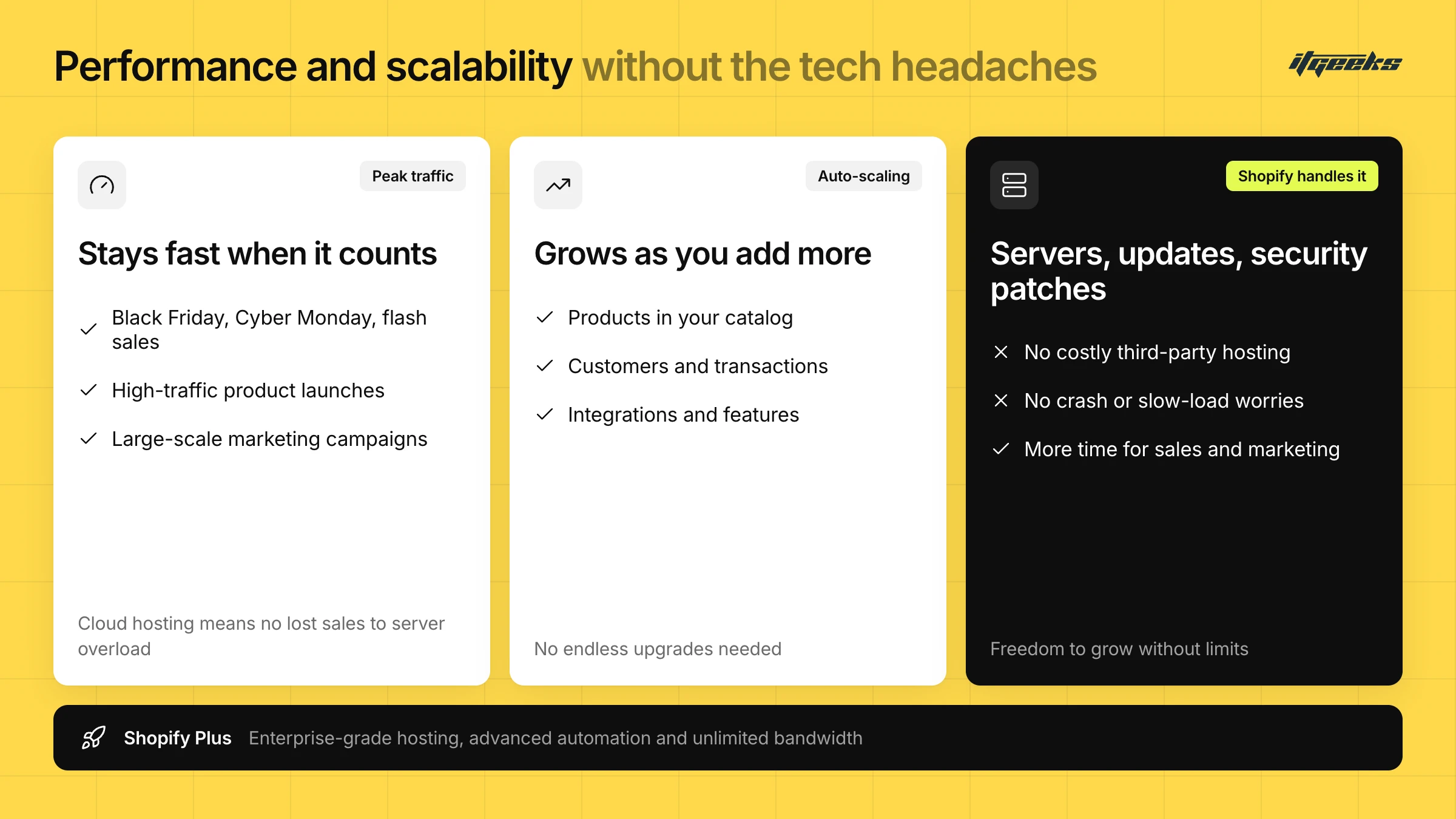
Every E-commerce business dreams of growth, but with that comes the challenge of maintaining a high-performing, scalable store. That’s where Shopify outshines the competition. If you're considering switching from BigCommerce to Shopify, one of the biggest advantages is knowing your store will be ready to handle increased traffic, growing product catalogs, and rising customer demand, without breaking a sweat.
Lightning-Fast Performance, Even at Peak Traffic
Speed is everything in E-commerce. A slow website can drive customers away and kill conversions. Shopify is built for high-speed performance, ensuring your store stays responsive even during:
Major sales events (Black Friday, Cyber Monday, flash sales)
High-traffic product launches
Large-scale marketing campaigns
Shopify’s cloud-based hosting takes server management off your plate and helps you avoid losing sales to server overloads.
Scalability That Grows With You
As your business expands, your E-commerce platform should keep up without requiring endless upgrades. Shopify’s auto-scaling infrastructure adjusts to your store’s needs, whether you're adding:
More products to your catalog
More customers and transactions
More integrations and features
For businesses with high-growth ambitions, Shopify Plus takes scalability to the next level with enterprise-grade hosting, advanced automation, and unlimited bandwidth, so you can focus on expansion, not platform limitations.
Focus on Growth, Not Tech Headaches
Forget about server management, software updates, or security patches. Shopify handles it all for you. That means:
No need for costly third-party hosting
No worrying about website crashes or slow load times
More time to focus on sales, customer experience, and marketing
Future-Proof Your E-Commerce Store
When you move from BigCommerce to Shopify, you’re not just moving your store. You’re investing in long-term success. With its high-performance infrastructure, built-in scalability, and hands-off server management, Shopify gives you the freedom to grow without limits.
Customer Support: Shopify vs. BigCommerce
When migrating your online store, reliable customer support isn’t just a bonus. It’s a necessity. A seamless transition requires a support team that’s quick, knowledgeable, and available when you need them most. This is where Shopify stands out.
Shopify’s 24/7 Support: Help Whenever You Need It!
Unlike other platforms, Shopify’s customer support is available 24/7, so no matter what your time zone or when an issue arises, help is always just a click away. Whether it’s midnight troubleshooting or a last-minute tweak before launch, Shopify ensures you're never left stranded.
Multiple Support Channels for Every Need
Shopify offers various ways to get assistance:
Live Chat: Instant support for urgent issues
Email: Detailed responses for in-depth queries
Phone Support: Personalized guidance for complex concerns (availability depends on your plan and region; Shopify lists priority 24/7 phone support for Plus)
Community Forums & Help Center: Access to guides, tutorials, and peer advice
Having multiple options means you can choose what works best for you, whether you prefer real-time solutions or in-depth written guidance.
Expertise That Goes Beyond Fixing Issues
Shopify’s support team isn’t just there for technical troubleshooting. They're platform experts. Need help with:
SEO optimization? They’ll guide you.
Apps & integrations? They’ll recommend the best ones.
Marketing strategies? They’ll point you in the right direction.
This level of proactive support makes Shopify more than just an E-commerce platform. It’s a growth partner.
How Does BigCommerce Compare?
BigCommerce also provides customer support, but key differences may impact your experience:
Availability: Both platforms advertise 24/7 chat and email support, and phone access varies by plan, so check exactly what your plan includes.
Response Times: Reply times vary by channel and plan on both platforms, so test them during your trial or ask your migration partner.
Depth of Knowledge: Shopify’s Help Center, Community and Partner network cover migration in depth, making the transition smoother.
Shopify Leads the Way
If quick responses, expert guidance, and round-the-clock availability matter to you, Shopify’s customer support is a strong choice. When moving your store, having the right support system can be the difference between a stressful migration and a seamless transition, and Shopify ensures you’re never alone in the process.
Ready for hassle-free migration with top-tier support? Shopify has got you covered!
What to Check Before You Migrate from BigCommerce to Shopify
A safe BigCommerce to Shopify migration protects your search rankings and your customer data. Before launch, benchmark your current organic traffic, map every old URL to its new Shopify URL, set up 301 redirects, rebuild the apps and payment setup you depend on, then test and monitor in Google Search Console.
Benchmark and back up. Export your products, customers, orders, pages and blog posts, and record your current organic traffic and top landing pages from Google Search Console.
Map your URLs. List every old URL and its new Shopify equivalent. Google recommends mapping old URLs to new ones and using server-side permanent redirects (301 or 308), pointing each old URL at its matching page rather than the home page (Google Search Central: site moves with URL changes).
Import your redirects. In Shopify admin, go to Content, then Menus, then URL redirects. You can bulk-import a CSV, and standard stores can hold up to 100,000 redirects. Fixed paths such as /products and /collections cannot themselves be redirected (Shopify Help Center).
Choose your migration method. Pick a CSV import, a migration app or a Shopify Partner based on catalogue size, order history and custom features.
Rebuild payments and apps. Confirm Shopify Payments is available in your country, set up your gateways, and match your BigCommerce integrations to Shopify apps.
Test, launch and monitor. Test redirects before go-live, update canonical tags and internal links, submit your new sitemap in Search Console and keep the redirects in place for at least a year, as Google advises. Expect some ranking fluctuation after launch.
For a fuller walkthrough, see our complete guide to migrating to Shopify, or explore our wider Shopify migration services.
BigCommerce to Shopify: Frequently Asked Questions
Is Shopify better than BigCommerce?
Neither platform is better for every store. Shopify usually suits merchants who want a larger app and theme ecosystem, easier day-to-day management and upgrades that are not tied to annual sales. BigCommerce suits teams that prefer more built-in features and no platform transaction fees. Compare total cost, the apps you need and your team’s skills before deciding.
How much does Shopify cost compared with BigCommerce?
On monthly billing, both list $39, $105 and $399 for their three main plans. BigCommerce moves you up at annual sales limits of $50K, $180K and $400K, while Shopify lets you choose when to upgrade. Shopify adds 2%, 1% or 0.6% on Basic, Grow and Advanced if you use a third-party gateway instead of Shopify Payments.
How long does it take to migrate from BigCommerce to Shopify?
Shopify says most businesses migrate in under three months. The timeline depends on catalogue size, order history, custom features, app replacements and whether you are redesigning at the same time. A simple catalogue can move faster, while complex or high-volume stores usually need a phased plan with a Shopify Partner.
Will I lose SEO rankings if I move from BigCommerce to Shopify?
Not if the move is planned. Map every old URL to its new Shopify URL, use permanent 301 redirects, keep them in place for at least a year as Google advises, update canonical tags and internal links, and submit the new sitemap in Search Console. Some temporary ranking fluctuation after launch is normal.
Can I move orders and customers to Shopify?
Yes. Shopify says products, customers, historical orders, gift cards, store credits, blogs and pages can be imported, usually with a migration app or a Shopify Partner. A manual CSV import cannot move some data, such as orders and blog posts. Archive your BigCommerce data first and confirm the scope in writing.
Conclusion: Take Your Store to the Next Level with Shopify & ITGeeks!
In today’s fast-paced digital world, choosing the right E-commerce platform isn’t just a decision. It’s a strategy. After exploring the key reasons to move from BigCommerce to Shopify, one thing is crystal clear: Shopify is more than a platform; it’s a powerhouse designed for growth.
From effortless migration and robust SEO features to seamless scalability and a thriving app ecosystem, Shopify offers a future-proof solution for businesses of all sizes. Whether you're a small business owner aiming for big results or a fast-growing enterprise ready to scale, Shopify provides the tools, flexibility, and world-class support to make it happen.
Why Partner with Shopify Plus Experts?
While Shopify simplifies E-commerce, partnering with certified Shopify Plus Experts like ITGeeks takes your success to the next level. As an official Shopify Platinum Partner, ITGeeks offers:
Custom store setup & seamless migration: ensuring a hassle-free transition.
Advanced development & integrations: tailored solutions to meet your business needs.
Optimized store performance & SEO: driving traffic and increasing conversions.
Ongoing support & maintenance: so your store runs smoothly 24/7.
By choosing ITGeeks, you’re not just getting a Shopify store. You’re getting an expert team dedicated to your E-commerce success. Whether you need a fully customized Shopify store, strategic growth solutions, or technical support, we’re here to empower your business every step of the way.
Your E-commerce journey is about to get extraordinary. Let Shopify be your launchpad, and ITGeeks be your launching partner! Ready to plan your move? Explore our BigCommerce to Shopify migration service or talk to our team.